
Check My Name in Voter List: Election Commission of India has published the voter list for 2026 on their official website. Thanks to the online system, you can conveniently check if your name is on the voter list without having to visit a booth with your ID proof or other necessary documents.
All elections in India are conducted under the oversight of the Election Commission. If you are a citizen of India and have turned 18 years old, you have the right to vote in your residential area. The Election Commission of India maintains a constituency-wise voter list that includes all eligible voters.
Check My Name in Voter List 2026
You can check your name in the electoral roll (voter list) either online or offline.
Search Name in Voter List Online – Check Electoral Roll & Polling Booth Details
You can easily check your voter registration details online in just a few minutes. Here’s how:
Option 1: Through the National Voters’ Service Portal (NVSP)
Here is the complete process to check if your name is on the voter list:
Step 1: Visit the National Voters' Services Portal of the Election Commission by clicking the link: https://www.nvsp.in.
Step 2: On the homepage, click on "Search in Electoral Roll" or use this direct link: https://electoralsearch.in.
Step 3: Click on "Search by Details" option.
Step 4: Enter your Name, Father's / Husband's Name, select your age from the drop down list, select your gender, state, district, and assembly constituency, then complete the CAPTCHA and click on the "Search" button.
Step 5: To search by EPIC No., click on "Search by EPIC No". Here is the direct link: https://electoralsearch.in.
Step 6: Enter your EPIC No., select your state from the list, complete the captcha code and click on the "Search" button.
[caption id="attachment_20132" align="alignnone" width="608"]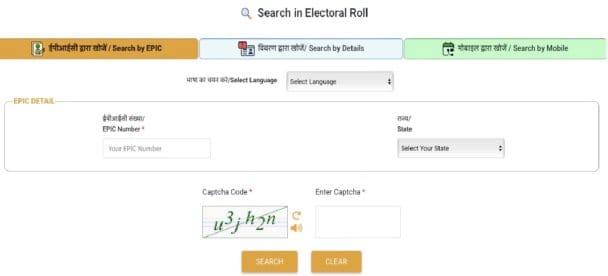 Check My Name in Voter List by EPIC Number[/caption]
Step 7: Download the voter list and take a printout of it for your records.
Option 2: Using the Voter Helpline App
STEP 1: Download the Voter Helpline App from the Google Play Store or Apple App Store.
STEP 2: Open the app and tap on “Search Your Name in Electoral Roll.”
STEP 3: Enter your details or EPIC number.
STEP 4: You can view and download your voter information directly on your phone.
Option 3: Through SMS
Steps to Check Your Name in Voter List via SMS
Step 1: Open the SMS app on your mobile phone.
Step 2: Type the following message:
ECI <Your EPIC Number>
(Example: ECI ABC1234567)
Step 3: Send this message to 1950 (do not include quotes).
Step 4: You will receive an SMS reply with your voter registration details, including your name and polling station information.
Highlights of Voter ID Search by Name
| Feature | Details |
|---|---|
| Purpose | To verify whether your name is included in the voter list |
| Authority | Election Commission of India (ECI) |
| Official Websites | www.nvsp.in, electoralsearch.eci.gov.in |
| Mobile App | Voter Helpline App (Android/iOS) |
| Offline Option | Visit your nearest Booth Level Officer (BLO) or Electoral Registration Office |
| Helpline Number | 1950 (available during office hours) |
| Languages Supported | English, Hindi, and other regional languages |
| Documents Required (if applying) | Aadhaar card, proof of age, residence proof, passport-size photo |
Also Read:
NVSP Voter List National Voter Service Portal Voter ID Search By Name
My voter id details
Plz help me for my new voter ID
My viter id details
check your Voter ID Details at National Voters' Services Portal (NVSP) by click on Search in Electoral Rol.
Mera votar I'd
Votar id
मतदान आयडी
मतदान आयडी